You know the pathophysiology of heart failure. You've memorized the diabetes management guidelines. You can recite the criteria for diagnosing depression.
But can you still make the right clinical decision at question #203, when your brain is exhausted, your eyes are blurring, and you've been making high-stakes choices for five straight hours?
That's the real test. And it's the part most students ignore until it's too late.
The MCCQE Part 1 isn't just a knowledge exam—it's an endurance event disguised as a multiple-choice test. You're facing 230 consecutive clinical decisions across 5.5 hours with only one lunch break. The students who fail aren't usually the ones who don't know medicine. They're the ones whose brains give out in the final 50 questions because they never trained for that specific level of sustained mental performance.
This is where exam simulations become essential. Not as just another way to practice questions, but as deliberate training for the psychological and cognitive demands of test day.
This guide will show you exactly how to use realistic MCCQE Part 1 simulations to build the mental stamina, pacing strategy, and decision-making endurance you need to perform when it actually counts.
Why Simulation Training Is Non-Negotiable
Let's start with an uncomfortable truth: doing practice questions in small, comfortable sets doesn't prepare you for the real exam environment.
The Stamina Problem Nobody Talks About
Most students study in 30-50 question chunks with breaks whenever they feel tired. Maybe you do 40 questions before dinner, take a break, check your phone, then maybe do another 30 before bed.
That's fine for learning content. But it's terrible preparation for maintaining peak cognitive function across 115 questions straight (the 2026 MCCQE format divides 230 questions into two sessions of 115 each).
What happens at question #85 when you've been concentrating intensely for two hours? What about question #200 in the afternoon session after lunch when food makes you slightly drowsy?
You need to know this before test day, not discover it during the actual exam.
Decision Fatigue Is Real and Devastating
Cognitive research shows that making repeated decisions—even small ones—depletes mental resources. Every question you answer on the MCCQE requires you to:
- Read and comprehend a clinical vignette
- Identify relevant information vs distractors
- Generate a differential diagnosis or treatment plan
- Evaluate 5 answer options
- Choose the single best answer
- Manage uncertainty about whether you're correct
- Move on without dwelling
Do this 230 times and your brain is doing serious work. By question #180, students without stamina training start making mistakes they never would have made fresh.
They choose the second-best answer because they can't summon the mental energy to carefully distinguish it from the best answer. They misread vignettes. They forget to check all the lab values. They second-guess correct instincts and change right answers to wrong ones.
This isn't a character flaw. It's predictable neurological fatigue from unprepared mental endurance demands.
Simulation Training Fixes This
Just like marathon runners train by running long distances (not just knowing about running), you need to train your brain to maintain clinical decision-making across marathon-length testing sessions.
Simulation training:
- Builds cognitive endurance so fatigue sets in later
- Teaches you to recognize when fatigue is affecting judgment
- Develops pacing strategies that conserve mental energy
- Creates familiarity with the exam interface (reducing anxiety)
- Identifies exactly when and why your performance degrades
You can't build this by doing 30 questions at a time. You build it by deliberately subjecting yourself to the full cognitive demands of exam-length sessions, analyzing what happens, and systematically improving your endurance.
The AllQbanks Simulation Environment
We designed our simulation platform to replicate the actual MCCQE Part 1 testing experience as closely as possible, for one reason: transfer of training.
The more similar your practice environment is to the real exam, the better your performance transfers to test day. Reduced anxiety, familiar interface, practiced pacing—it all compounds.
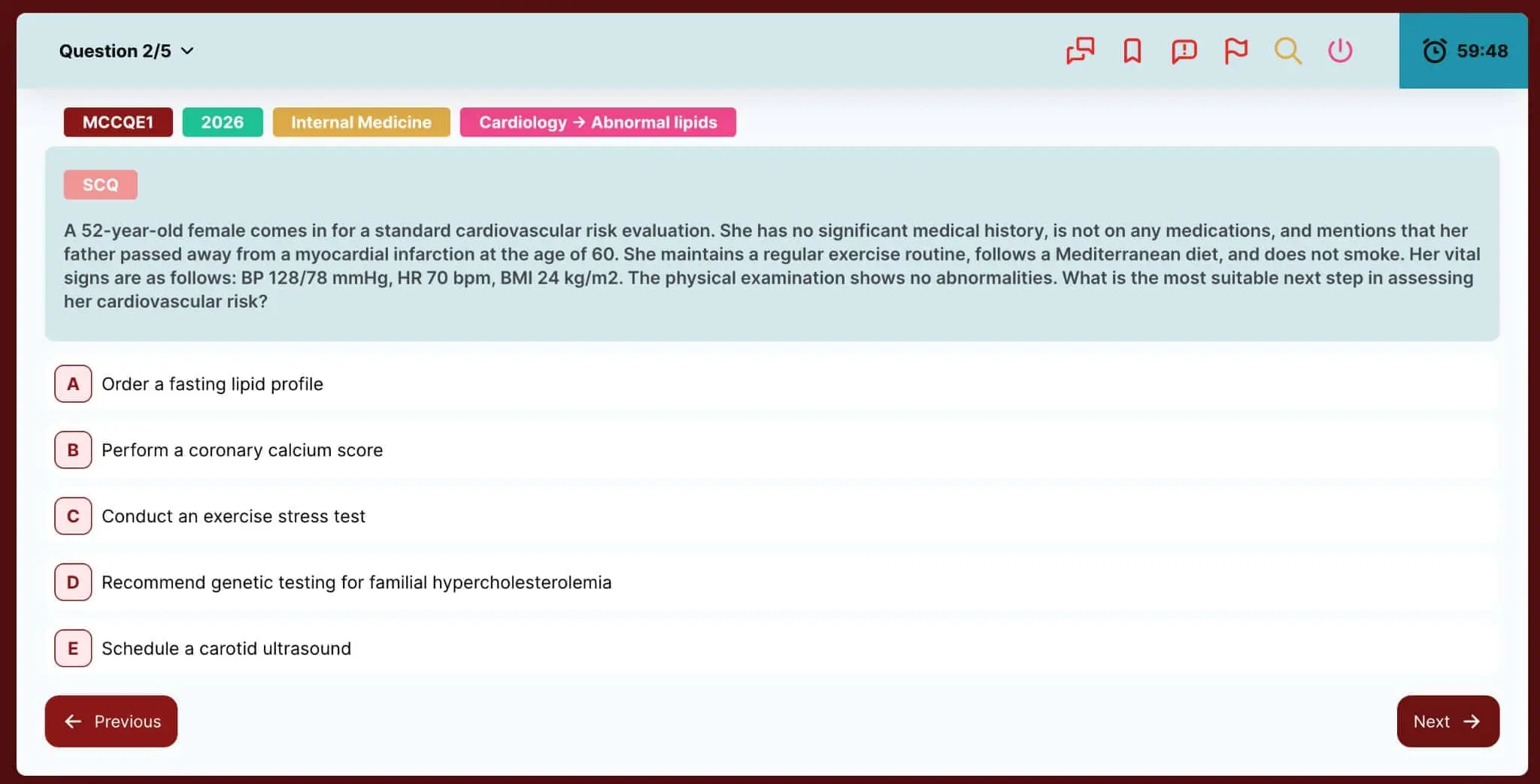
Prometric-Style Interface
The visual environment matters more than you'd think. If you've only practiced on a platform with a completely different layout, the real exam interface will feel foreign and add unnecessary cognitive load.
Our simulation interface mirrors Prometric's design:
- Clean, distraction-free layout
- Vignette on left, answer options on right
- Clear question counter and timer
- Bookmark/flag functionality matching real exam
- Standard navigation controls

What this does psychologically: On test day, when anxiety is high, familiarity is your friend. If the interface feels like "just another practice session," your nervous system stays calmer and your prefrontal cortex can focus on clinical reasoning instead of adapting to a new environment.
Configurable Session Parameters
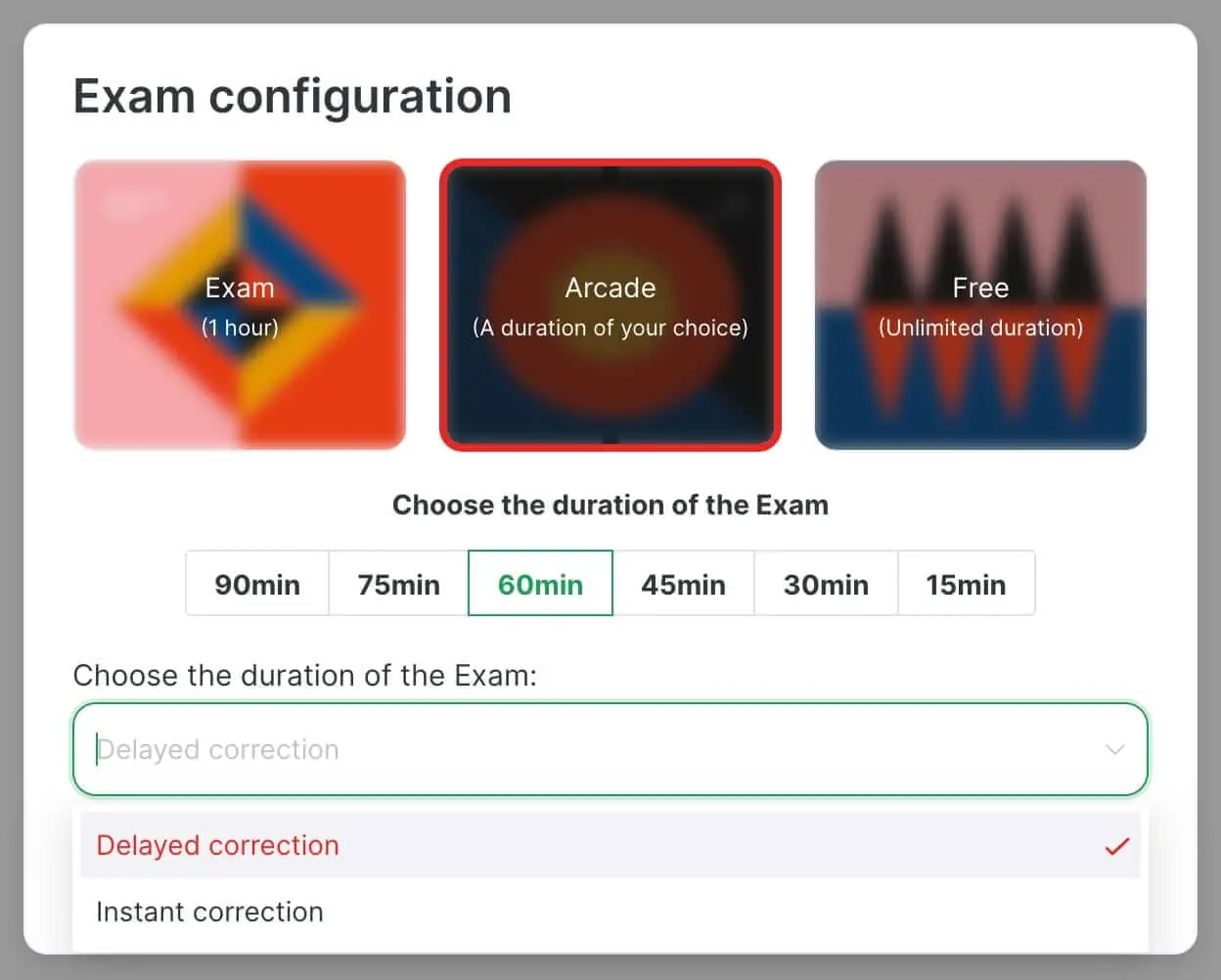
Before starting a simulation, you configure every parameter to match your training needs:

Number of questions:
- Short stamina builders: 50-75 questions
- Half-exam simulations: 115 questions (matches one MCCQE session)
- Full exam simulations: 230 questions with scheduled break
Subject distribution:
- Random mix across all subjects (most realistic)
- Weighted toward specific areas using our custom builder
- Pure subject drills for targeted endurance training
Time limits:
- Timed (160 minutes for 115 questions, matching real exam)
- Untimed (for pure learning without pressure)
- Custom time limits (for progressive overload training)
Correction mode:
- Instant Correction: See answers and explanations immediately (best for learning mode, not simulation)
- Delayed Correction: No answers until session complete (true simulation mode)
For genuine exam simulation, you want: 115 questions, random subject mix, 160-minute timer, delayed correction mode. This is your marathon training.
How to Use Simulations Throughout Your Preparation
Simulations serve different purposes depending on where you are in your study timeline. Here's how to use them strategically.
Early Preparation (Months 1-2): Diagnostic Baseline
Goal: Identify what you know and don't know
Approach: Take one full-length simulation (230 questions, timed, delayed correction) within your first two weeks of preparation.
Yes, it will be humbling. You might score 50-60% or lower. That's expected and valuable.
What you gain:
- Baseline performance data across all subjects
- Reality check on timing and stamina
- Identification of major knowledge gaps
- Understanding of question difficulty and style
- Motivation clarity (knowing what you're up against focuses preparation)
Don't take simulations too frequently at this stage—spacing them every 2-3 weeks allows time for learning between assessments.
Mid-Preparation (Months 3-4): Building Endurance
Goal: Systematically build mental stamina and fix weaknesses
Approach: Weekly half-exam simulations (115 questions, timed)
The protocol:
- Saturday morning: Take 115-question simulation, timed, delayed correction
- Saturday afternoon: Review all questions, especially incorrect ones
- Sunday-Friday: Use targeted practice (via exam builder) to address weak topics identified in simulation
- Repeat next Saturday
This rhythm builds endurance progressively while using simulation results to guide focused studying during the week.
What to track:
- Overall percentage correct (should improve week over week)
- Performance by subject (identifies persistent weaknesses)
- Performance by question number (identifies when fatigue kicks in)
- Time management (are you finishing with time to review, or rushing at the end?)
If you notice you're consistently strong through question #80 but performance drops sharply after, that's your current endurance ceiling. You're building stamina to push that ceiling higher.
Late Preparation (Final 4-6 Weeks): Full Exam Rehearsals
Goal: Perfect your exam-day execution and build peak stamina
Approach: Weekly full-length simulations (230 questions with scheduled break)
The exact protocol to mirror test day:
Morning Session:
- Start at same time as your scheduled exam (e.g., 8:00 AM)
- 115 questions, 160-minute timer
- No breaks, no phone, no interruptions
- Delayed correction mode
Mandatory 45-Minute Break:
- Eat a light lunch (same food you plan for test day)
- Walk around briefly
- No studying, no reviewing
- Note your mental state
Afternoon Session:
- Start exactly 45 minutes after morning finish
- 115 questions, 160-minute timer
- Push through fatigue (this is the hardest part)
- Finish strong
Review:
- Don't review immediately after finishing (you're exhausted)
- Wait 2-3 hours or review the next day when fresh
- Analyze patterns, not just individual questions
Do this 2-3 times in your final month. Each repetition builds confidence, refines pacing, and increases endurance ceiling.
The Week Before the Exam
Goal: Maintain sharpness without burning out
Approach: One moderate-length simulation (50-75 questions) in Instant Correction Mode on easier material
This is NOT the time for brutal full-length marathons. You should be tapering down. The goal is staying sharp and maintaining confidence, not grinding yourself into exhaustion.
The Simulation Interface: Maximizing Every Feature
Understanding how to use every element of the interface efficiently saves mental energy for clinical reasoning.
Navigation and Flagging System
Question counter: Shows where you are (e.g., "Question 47/115"). Use this for pacing checks:
- At Question 30: You should have ~90 minutes left (~1/3 through time and questions)
- At Question 60: You should have ~70 minutes left (just past halfway)
- At Question 90: You should have ~30 minutes left (final push + review time)
If you're significantly behind these benchmarks, you need to speed up. If you're way ahead, you might be rushing—slow down slightly and think carefully.
Bookmark/flag function: Mark questions you're unsure about for end-of-exam review. But use this strategically:
âś… Good use: "I narrowed this to two options, made best guess, want to reconsider if time permits"
❌ Bad use: Flagging 40+ questions because you're hoping to review everything (you won't have time)
A good target: flag no more than 10-15 questions per 115-question session. If you're flagging 30+, you're either going too fast or under-prepared.
Timer Management
The countdown timer is always visible. This can be helpful (keeps you paced) or anxiety-inducing (creates panic).
Mental reframe: The timer is not your enemy. It's your pacing coach.
Check it at regular intervals (every 20-25 questions), not constantly. Constantly watching the clock burns mental energy.
Lab Values and References
Critical lab reference values are available with one click. Know this exists and practice using it:
- Quickly checking normal ranges without breaking concentration
- Returning to question seamlessly
The small cognitive cost of clicking away to check a value can prevent a wrong answer due to remembered value uncertainty.
Discussion and Help Features
During simulations in Delayed Correction mode, these aren't available until after you finish (maintaining exam realism).
But after reviewing your results:
Discussion threads: See how other students reasoned through questions you missed. Sometimes a peer's explanation resonates better than the official one.
For our interactive medical community features and how collaborative learning enhances understanding, check out that guide.
AI tutor access: When the official explanation doesn't fully clarify your confusion, the AI tutor provides personalized follow-up answers to specific questions:
- "Why is this treatment preferred over that one in this specific scenario?"
- "What's the mechanism explaining this lab finding?"
- "How do I distinguish these two similar conditions?"
Delayed Correction Mode: Why It's Essential
This is the mode that separates simulation from ordinary practice.
What It Does
In Delayed Correction Mode:
- You answer all questions in the session
- No feedback on whether you're correct or incorrect
- No explanations until you complete and submit the entire session
- Timer runs continuously
- You must manage uncertainty and keep moving forward
This is psychologically uncomfortable. That's the point.
Why It Matters
The MCCQE Part 1 doesn't tell you if you got the last question right before moving to the next one. You have to make a decision, accept the uncertainty, and continue.
This uncertainty creates anxiety. Anxiety creates cognitive interference. Learning to maintain good decision-making while experiencing uncertainty and anxiety is a skill that requires practice.
What Delayed Mode trains:
- Decision confidence without external validation
- Moving forward despite uncertainty
- Not dwelling on previous questions
- Managing test anxiety
- Pacing yourself when you can't see running scores
Students who only practice in Instant Correction Mode get addicted to the immediate feedback dopamine hit. On test day, that's gone, and they psychologically struggle with the uncertainty.
Train yourself to be comfortable with uncertainty. Delayed Correction Mode is how you do it.
When to Use Instant vs Delayed
Use Instant Correction when:
- Learning new material for the first time
- Reviewing previously incorrect questions
- Doing targeted topic drills (not simulations)
- Score is below 60% and you need to understand errors immediately
Use Delayed Correction when:
- Simulating actual exam conditions
- Testing whether you've mastered material
- Building mental endurance
- Score is above 65-70% and you're ready to test yourself
- Within 6-8 weeks of exam date
Reviewing Your Simulation Results: The Real Learning Happens Here
Finishing the simulation is only half the work. The review process is where growth occurs.
Immediate Post-Simulation: Take a Break
After completing a 115 or 230-question simulation, you're cognitively depleted. This is not the optimal time for deep learning.
Take a real break:
- Walk outside for 20 minutes
- Eat something
- Don't look at medical content
- Let your brain decompress
Review either later that evening (after several hours) or the next morning when you're fresh. You'll comprehend the explanations better and make better learning decisions.
Performance Analytics: What to Look For
After each simulation, you get detailed performance breakdowns:
Overall Performance:
- Total percentage correct
- Comparison to previous simulations (trending up or down?)
- Percentile ranking among other users
Performance by Subject:
- Breakdown showing your accuracy in each medical discipline
- Identify which subjects need more focus (e.g., 75% on Medicine but 45% on Psychiatry)
- Track improvement trends across different content areas
Performance by Question Number (if tracking time stamps):
- Did you maintain steady accuracy throughout?
- Or did performance drop significantly in final 30 questions? (endurance problem)
Peer Comparison Statistics:
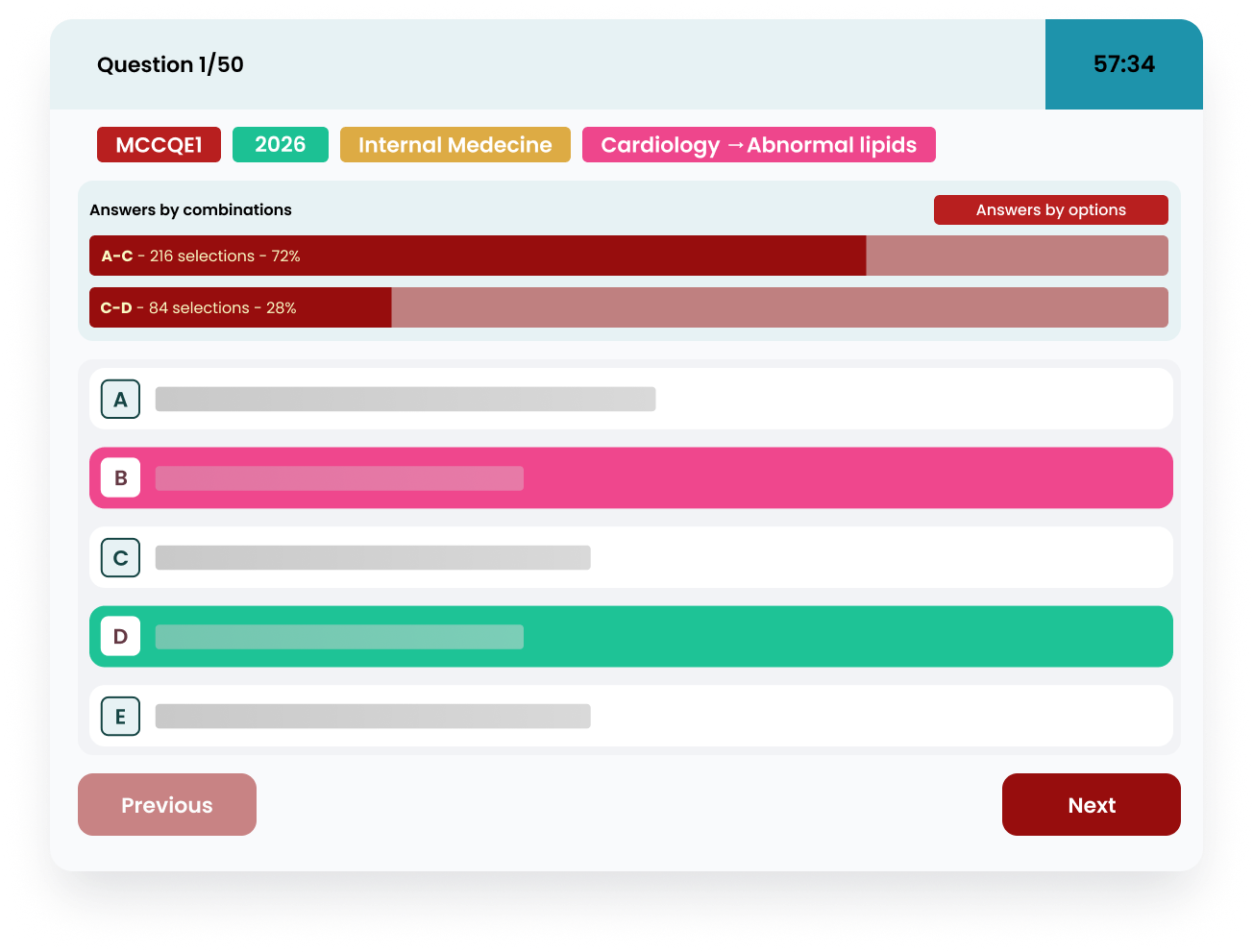
After reviewing your answers, you can also see how other students performed on the same questions. This peer data shows:

- Answer combinations: How many students selected specific answer pairs (useful for multi-step questions)
- Individual answer choices: Distribution of what percentage of students selected each option (A, B, C, D, E)
This context is valuable for calibration:
- If 85% of students got a question right and you missed it → High-yield concept requiring immediate review
- If only 25% got it right → Difficult question, lower priority for intensive review
- If most students fell for the same distractor you chose → Common misconception to understand
Time Management Analysis:
- Did you finish with time to review flagged questions?
- Or were you rushing in the final 10 minutes?
- Did you spend too long on difficult questions early, creating time pressure later?
Use this data to adjust your strategy:
- If rushing: Practice slowing down on early questions to reduce careless mistakes
- If time excess: Practice working slightly faster on straightforward questions, spending saved time on difficult ones
- If late-session fatigue: Increase stamina training frequency
Reviewing Individual Questions
Don't review every question equally. Prioritize:
#1 Priority: Questions you got wrong and felt confident about
These reveal dangerous knowledge gaps—you didn't even know you didn't know. These are the ones that will surprise you on test day.
#2 Priority: Questions you got wrong and weren't sure about
These confirm suspected weaknesses. Use targeted practice (via custom builder) to drill these topics.
#3 Priority: Questions you got right but guessed
You got lucky. Don't let luck breed false confidence. Understand the concept properly.
#4 Priority (if time): Questions you got right and felt confident about
Skim the explanation to confirm your reasoning was sound. Sometimes you get the right answer for the wrong reason.
Using Explanations Effectively
For each incorrect question, don't just read the explanation passively. Actively engage:
- Before reading explanation: Re-read the vignette and try to identify what you missed or misunderstood
- Read the explanation: Understand not just the right answer, but why the others are wrong
- Identify the error type:
- Knowledge gap (didn't know the fact)
- Application error (knew the fact, applied incorrectly)
- Reading error (missed key detail in vignette)
- Reasoning error (faulty clinical logic)
- Create a correction strategy: What would prevent this error next time?

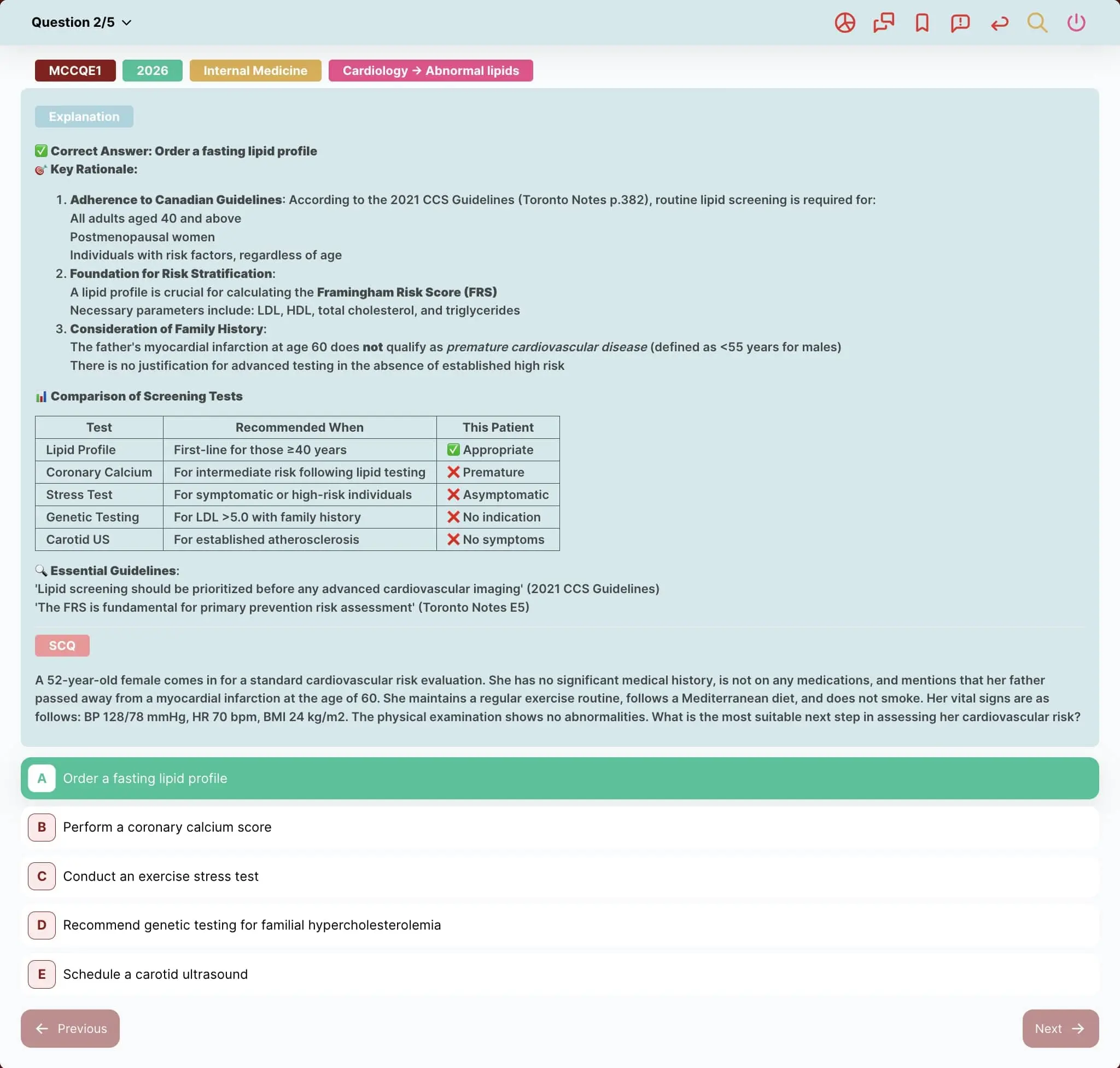
The explanations show you:
- Why the correct answer is correct (with supporting evidence/guidelines)
- Why each distractor is wrong (preventing similar future mistakes)
- Key concepts tested
- Peer performance statistics (did others struggle too, or just you?)
If you see 85% of students got the question right and you missed it: high-yield concept you need to master.
If only 35% got it right: difficult question, lower priority for review.
Building a Simulation Training Schedule
Here's a practical week-by-week simulation schedule integrated into comprehensive MCCQE prep.
Weeks 1-8: Foundation + Baseline Assessment
- Week 1: Diagnostic full simulation (230 Q, identify baseline)
- Weeks 2-8: Content review + weekly 50-question timed quizzes (not full simulations yet)
Weeks 9-16: Endurance Building
- Every Saturday: 115-question half-exam simulation (timed, delayed)
- Sunday-Friday: Targeted practice on weak subjects from Saturday simulation
- Weekly goal: Improve overall percentage + push fatigue threshold later
Weeks 17-20: Peak Training
- Every 4-5 days: Full 230-question simulation (with break)
- Between sims: Targeted weakness drilling + lighter review
- Goal: Consistent 70%+ performance across all subjects and question ranges
Week 21: Taper + Confidence
- Monday: 75-question moderate-difficulty session (instant mode)
- Wednesday: Light review only
- Friday: 30-question confidence booster (only strong subjects)
- Weekend before exam: Minimal studying, rest, logistics prep
Common Simulation Mistakes (And How to Fix Them)
Smart, hardworking students make these preventable errors:
Mistake #1: Only Using Instant Correction Mode
It feels better to see answers immediately, but you're not training for uncertainty tolerance. If you're always using Instant mode, you're unprepared for test-day psychology.
Fix: Transition to Delayed mode once you're scoring above 65%. Reserve Instant for learning new material only.
Mistake #2: Taking Simulations Too Frequently
More isn't better. Taking daily simulations creates burnout without allowing time for learning between assessments.
Fix: Space simulations at least 4-7 days apart. Use time between for targeted study based on simulation results.
Mistake #3: Not Simulating the Full Experience
Taking a 230-question simulation over two days, or with multiple breaks, or while checking your phone isn't simulation—it's just doing questions.
Fix: When doing full simulations, treat them like the real exam. Same time of day, same environment, same break structure.
Mistake #4: Skipping the Review Process
Finishing the simulation and just noting the score wastes the learning opportunity. The growth happens in review.
Fix: Block 2-3 hours for reviewing a full simulation. If you don't have time to review, don't take the simulation yet.
Mistake #5: Not Tracking Performance Trends
One simulation score tells you little. Trends tell you everything. If your scores are stagnant or declining, your study approach needs adjustment.
Fix: Maintain a simple spreadsheet: Date, Score %, Subject breakdowns, Key weaknesses, Next focus area.
Frequently Asked Questions
When should I start taking full-length simulations?
Start with a diagnostic baseline in Week 1-2 of preparation, then avoid full-lengths until about 8-10 weeks before your exam. Early prep should focus on content learning and targeted practice. Full simulations are most valuable in the second half of your preparation timeline when you have enough knowledge to benefit from the endurance training.
How many full simulations should I take before the exam?
Aim for 4-6 full-length (230-question) simulations in your final 8 weeks, plus 8-10 half-length (115-question) simulations. More than this risks burnout. Fewer than this leaves you undertrained for the stamina demands. Quality review matters more than quantity of simulations taken.
What score on simulations predicts passing the real MCCQE?
Consistently scoring 65-70%+ on well-constructed simulations suggests good readiness. The actual MCCQE Part 1 passing standard (scaled score ≥226) doesn't directly correlate to a percentage, but candidates scoring consistently above 65% on quality practice tend to pass comfortably. Focus more on upward trends than absolute scores.
Should I review my simulation results immediately or wait?
Wait at least 2-4 hours, ideally reviewing the next day. Post-simulation cognitive fatigue impairs learning. You'll comprehend explanations better and make better study decisions when your brain is fresh. The only exception: quick review of major knowledge gaps if you're genuinely unfamiliar with entire topics.
How do I build stamina if I keep making mistakes in the final 30 questions?
Progressive overload: gradually extend your continuous practice sessions. If fatigue kicks in at question #80, don't just keep doing 115-question sets hoping it improves. Do 60-question sets until smooth, then 75, then 90, then 115. Build endurance systematically. Also ensure proper sleep, nutrition, and breaks between study sessions—physical health directly impacts cognitive endurance.
Can I use simulations for targeted subject practice or only mixed reviews?
Both. Use the exam builder to create subject-specific simulations. For example, if Pediatrics is weak, create a 75-question pure Pediatrics simulation to build both content mastery AND endurance in that subject. Mix targeted subject simulations with comprehensive mixed simulations for balanced preparation.
Integrating Simulations into Comprehensive Preparation
Simulations are one piece of a complete MCCQE Part 1 preparation strategy.
For complete exam overview including format, content, and study timeline, see our comprehensive MCCQE Part 1 guide.
To understand specific challenges of the new all-MCQ format, read about MCCQE 2026 format changes and why mental stamina is now even more critical.
For creating targeted practice between simulations, use our custom exam builder to drill specific weaknesses identified through simulation analytics.
For collaborative learning and question discussion, join our interactive medical community to discuss difficult questions with peers.
For instant clarification on confusing topics, use the AI tutor feature to get personalized explanations beyond standard answer keys.
Each tool serves a purpose. Simulations test readiness and build stamina. Targeted practice fixes weaknesses. Content review builds knowledge. Community provides support. Integrate all strategically.
Final Thoughts: Training for What Actually Matters
The MCCQE Part 1 doesn't just test what you know. It tests your ability to apply what you know under conditions of sustained cognitive demand, time pressure, and uncertainty.
You can have perfect knowledge and still perform poorly if your brain gives out at question #150 due to untrained endurance.
You can be brilliant at clinical reasoning in small doses and still make careless mistakes when decision fatigue sets in after hours of testing.
These aren't character flaws. They're predictable physiological responses to demands you haven't trained for.
Exam simulations are how you close that gap. They're your mental endurance training, your test-day rehearsal, your confidence builder, and your reality check all in one.
Use them strategically throughout your preparation. Push yourself through the uncomfortable experience of marathon-length testing. Build the stamina to maintain excellent clinical reasoning even when exhausted.
Because on test day, the students who succeed aren't just the ones who know medicine—they're the ones whose brains can still perform at question #230 exactly as well as they did at question #1.
Train for that reality.
Ready to start building your mental stamina? Launch your first MCCQE Part 1 simulation now and experience what test day will actually feel like.
Related Posts
resourcesupdatesMCCQE Part 1 2026: Complete Guide to the New 100% MCQ Format
MCCQE Part 1 2026 is 100% MCQ after CDM removal. Discover why it's harder, how to adjust your study strategy, and the exact preparation timeline for success. Complete guide inside.
AllQbanks •Â
Jan 25, 2026
resourcestipsMCCQE Part 1: Complete Guide to Canada's Medical Licensing Exam
Comprehensive MCCQE Part 1 guide covering exam format, eligibility, preparation strategies, scoring system, and timeline. Essential resource for medical students and international medical graduates pursuing Canadian medical licensure.
AllQbanks •Â
Jan 29, 2026